MS-CIT | BASIC COMPUTER & OFFICE MANAGEMENT | TALLY PRIME & GST | ADVANCE EXCEL | GRAPHIC DESIGN | SOFTWARE TRAINING | HARDWARE TRAINING | 2D & 3D ANIMATION | AUTOCAD & 3DS MAX

TIIT Computer Education

Diploma in Cloud Computing
(Networking + Linux + Hardware + Python + AWS)

Time Duration: 90 hours

Networking

Module 1: Introduction to Networking
  • What is a network?
  • Types of networks: LAN, WAN, MAN, PAN
  • Network topologies: Star, Ring, Bus, Mesh, Hybrid
  • Network components: Router, Switch, Hub, Modem, Access Point
  • OSI Model Overview (7 Layers)
Module 2: Network Protocols and Models
  • OSI vs TCP/IP models
  • Protocols and their functions:
    • IP (Internet Protocol)
    • TCP (Transmission Control Protocol)
    • UDP (User Datagram Protocol)
    • HTTP/HTTPS, FTP, SMTP, DNS
  • IP Addressing (IPv4 & IPv6)
  • Subnetting and CIDR notation
Module 3: IP Addressing and Subnetting
  • Private vs Public IP addresses
  • Network masks and subnetting
  • Calculating network, broadcast, and host addresses
  • Introduction to NAT (Network Address Translation)
  • Hands-on subnetting exercises
Module 4: Switching and Routing Basics
  • Difference between switch, router, and hub
  • MAC addresses and ARP
  • Routing basics: Static vs Dynamic routing
  • Common routing protocols: RIP, OSPF, EIGRP
  • VLANs and inter-VLAN routing
Module 5: Network Devices and Cabling
  • Types of network devices: Switches, Routers, Firewalls, Access Points
  • Cables and connectors: Twisted Pair (Cat5/6), Fiber Optics, Coaxial
  • Wireless networking basics (Wi-Fi standards, channels, SSID)
Module 6: Wireless Networking
  • Wi-Fi standards (802.11 a/b/g/n/ac/ax)
  • Wireless security: WEP, WPA, WPA2, WPA3
  • SSID, channel, and frequency basics
  • Wireless troubleshooting and site surveys
Module 7: Network Security Fundamentals
  • Introduction to network security
  • Firewalls, VPNs, IDS/IPS
  • Security best practices: Password policies, ACLs
  • Basic encryption concepts (SSL/TLS, HTTPS)
Module 8: TCP/IP and Ports
  • Understanding TCP/IP stack
  • Common ports and their services:
    • HTTP → 80, HTTPS → 443
    • SSH → 22, FTP → 21, DNS → 53
  • Packet structure basics
  • Packet capture and analysis using Wireshark
Module 9: Network Troubleshooting
  • Troubleshooting methodology
  • Common commands: ping, tracert/traceroute, ipconfig/ifconfig, nslookup, netstat
  • Identifying and solving connectivity issues
  • Using logs and monitoring tools
Networking Course

Linux

Module 1: Introduction to Linux
  • What is Linux and its history
  • Linux distributions (Ubuntu, CentOS, Fedora, Debian)
  • Open source philosophy and community
  • Linux vs Windows comparison
  • Linux architecture overview (Kernel, Shell, File System)
Module 2: Linux Installation & Environment
  • Installing Linux (Desktop & Server versions)
  • Using Live CD/USB
  • Logging in and understanding the shell
  • Desktop vs Terminal interface
  • Introduction to the Linux terminal
Module 3: Linux File System
  • Directory structure and hierarchy (/, /home, /etc, /var)
  • Absolute vs relative paths
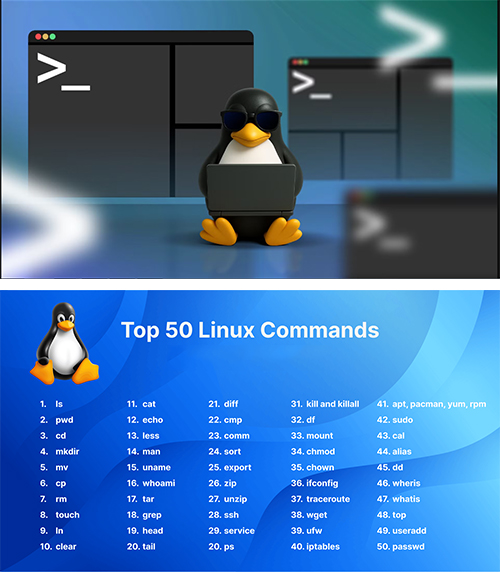
  • Basic file commands: ls, cd, pwd, tree
  • Creating, copying, moving, and deleting files & directories: cp, mv, rm, mkdir, rmdir
  • File permissions and ownership (chmod, chown, chgrp)
Module 4: Basic Linux Commands
  • Viewing file content: cat, less, more, head, tail
  • Searching: grep, find, locate
  • File operations: touch, nano, vi/vim
  • Disk usage: df, du
  • System info: uname, hostname, uptime
Module 5: Users and Groups
  • Creating and managing users: useradd, usermod, passwd
  • Managing groups: groupadd, gpasswd
  • Switching users: su, sudo
  • Permissions and ownership concepts
  • Understanding special permissions: SUID, SGID, Sticky Bit
Module 6: Package Management
  • Package managers: apt (Debian/Ubuntu), yum/dnf (CentOS/Fedora)
  • Installing, updating, and removing packages
  • Searching for packages
  • Checking installed packages and versions
Module 7: Processes and Jobs
  • Understanding processes and PID
  • Viewing processes: ps, top, htop
  • Managing processes: kill, pkill, nice, renice
  • Background and foreground jobs: &, jobs, fg, bg
  • Scheduling tasks: cron and at
Module 8: Networking Basics
  • Checking network interfaces: ifconfig/ip a
  • Network connectivity: ping, traceroute, netstat
  • SSH basics: connecting to remote servers
  • File transfers: scp, rsync
  • Basic firewall: ufw, iptables
Module 9: File Compression & Archiving
  • Archiving files: tar
  • Compression utilities: gzip, bzip2, zip, unzip
  • Extracting files and directories
Module 10: Logs and System Monitoring
  • Viewing logs: /var/log/syslog, /var/log/messages, dmesg
  • Monitoring system resources: free, df, uptime, vmstat
  • Disk usage and quotas
Module 11: Shell Scripting Basics
  • Introduction to Bash scripting
  • Variables and user input
  • Conditional statements (if, else, elif)
  • Loops (for, while, until)
  • Writing simple automation scripts
Module 12: Basic Security
  • File permissions and user access control
  • Using sudo for administrative tasks
  • SSH key authentication
  • Basics of Linux firewall and iptables/ufw
  • Updating the system for security patches
Linux Course

Computer Hardware

Module 1: Introduction to Computer Hardware

  • Definition of computer hardware
  • Difference between hardware and software
  • Overview of computer components: Input, Output, Storage, Processing, and Memory
  • Types of computers: Desktop, Laptop, Server, Embedded systems

Module 2: Central Processing Unit (CPU)

  • Function of the CPU
  • CPU components: ALU (Arithmetic Logic Unit), CU (Control Unit), Registers
  • CPU types: Single-core, Multi-core, and Multi-threading
  • Clock speed and performance factors
  • Motherboard-CPU interaction

Module 3: Memory and Storage

  • Primary Memory (RAM, ROM)
  • Secondary Storage (HDD, SSD)
  • Cache Memory
  • Virtual Memory and Paging
  • Memory performance factors

Module 4: Motherboard

  • Function and importance
  • Components on motherboard: Chipset, BIOS/UEFI, Slots, Ports
  • Form factors: ATX, Micro-ATX, Mini-ITX
  • Expansion slots and connectors (PCI, PCIe)

Module 5: Input Devices

  • Keyboard, Mouse, Joystick, Scanner
  • Types and interfaces (USB, PS/2, Wireless)
  • Input device functionality and troubleshooting

Module 6: Output Devices

  • Monitor types: LCD, LED, OLED
  • Printers: Inkjet, Laser, Dot Matrix
  • Speakers, Projectors
  • Display resolutions, refresh rates, and color depth

Module 7: Storage Devices

  • Hard Disk Drive (HDD) and Solid State Drive (SSD)
  • Optical Storage: CD, DVD, Blu-Ray
  • Flash Drives, Memory Cards
  • Storage interfaces: SATA, NVMe, M.2

Module 8: Power Supply Unit (PSU)

  • PSU function and types
  • Power ratings and efficiency
  • Connectors and cables for components
  • Safety precautions and troubleshooting

Module 9: Peripheral Devices

  • External devices: USB devices, printers, scanners, external storage
  • Ports and interfaces (USB, HDMI, DisplayPort, Ethernet)
  • Connectivity and device installation

Module 10: Networking Hardware

  • Routers, Switches, Hubs, Modems
  • Network Interface Cards (NICs)
  • Cabling: Twisted Pair, Fiber Optics, Coaxial
  • Basic troubleshooting of network devices

Module 11: Hardware Troubleshooting

  • Identifying hardware problems
  • POST (Power-On Self-Test) and beep codes
  • Diagnostic tools: Multimeter, POST cards, hardware monitors
  • Replacing faulty components

Module 12: Assembling and Maintenance

  • Step-by-step PC assembly
  • Installing CPU, RAM, storage, GPU, PSU
  • Cable management
  • Cleaning and preventive maintenance
  • Understand the interfaces and connectivity options for peripherals and storage
Computer Hardware Course

Cloud Computing

AWS (Amazon Web Services)

Module 1: Introduction to Cloud Computing

  • What is cloud computing?
  • Benefits of cloud computing: Scalability, Flexibility, Cost efficiency
  • Cloud service models:
    • IaaS (Infrastructure as a Service)
    • PaaS (Platform as a Service)
    • SaaS (Software as a Service)
  • Cloud deployment models: Public, Private, Hybrid

Module 2: AWS Overview

  • Introduction to Amazon Web Services (AWS)
  • AWS Global Infrastructure: Regions, Availability Zones, Edge Locations
  • AWS Free Tier and services overview
  • AWS Management Console and CLI introduction

Module 3: Core AWS Services

  • Compute: EC2, Lambda, Elastic Beanstalk, Lightsail
  • Storage: S3, EBS, EFS, Glacier
  • Database: RDS, DynamoDB, Redshift, Aurora
  • Networking: VPC, Route 53, CloudFront, Elastic Load Balancer

Module 4: Security and Compliance

  • Shared Responsibility Model
  • AWS Identity and Access Management (IAM)
  • AWS Key Management Service (KMS)
  • Security best practices
  • Compliance programs (ISO, SOC, GDPR)

Module 5: Billing and Pricing

  • AWS pricing models: On-demand, Reserved, Spot, Savings Plans
  • Cost optimization strategies
  • AWS Budgets and Cost Explorer
  • Total Cost of Ownership (TCO) and pricing calculator

Module 6: Cloud Architecture Principles

  • Well-Architected Framework overview
  • High availability and fault tolerance
  • Scalability and elasticity concepts
  • Disaster recovery strategies

Module 7: Monitoring and Management

  • AWS CloudWatch for monitoring resources
  • AWS CloudTrail for auditing and logging
  • AWS Trusted Advisor for optimization recommendations
  • AWS Service Health Dashboard

Module 8: AWS CLI and SDK Basics (Optional)

  • Introduction to AWS CLI
  • Running basic AWS CLI commands
  • Understanding SDKs for automation (Python boto3, JavaScript, etc.)

Module 9: Exam Preparation

  • Understanding exam format: Multiple choice / multiple response
  • Sample questions and quizzes
  • Exam-taking strategies and tips
  • Hands-on practice in AWS Free Tier
Cloud Computing Course